
5 Best TradingView Alternatives for Crypto Traders in 2026: Next-Gen Charting & AI Tools
Last updated: 2026
This comparison draws on product testing, platform documentation, and publicly available information. Pricing and features change, so confirm current details with each vendor before deciding.
The strongest TradingView alternative for crypto traders in 2026 is TakeProfit, with TrendSpider, Coinigy, GoCharting and MetaTrader 5 covering the niches it does not. Each addresses a friction point that TradingView either prices behind a premium tier or has not solved. This guide ranks them by what a working crypto trader needs: multi-exchange real-time data, scriptable indicators, un-gated strategy backtesting, and an interface that holds up when liquidity floods in.

Know when your
coins move
Alerts, real-time prices, and market news — all in one app
 4.8 based on 40K reviews in the App Store and Google Play


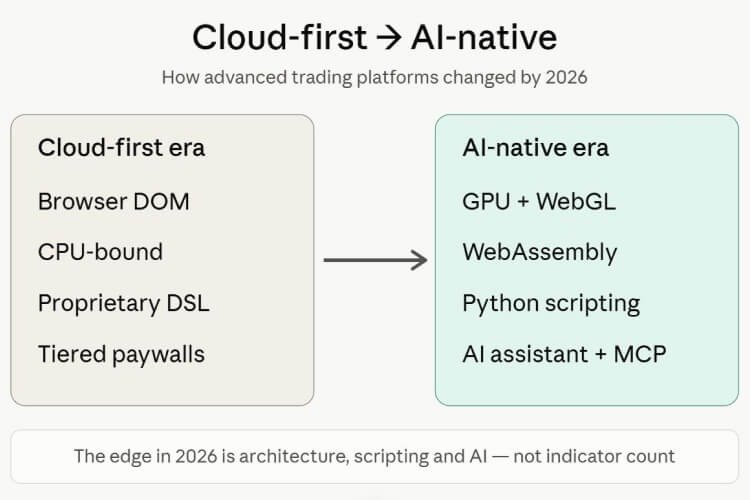
The market itself explains the shift. Around 2015, charting meant a desktop terminal or a static web chart, and the question was which had more indicators. By the early 2020s, the cloud platform won, led by TradingView’s social charting model. In 2026 the ground is moving again. The bottleneck is less about features than about performance under load and how well a platform’s scripting language works with an AI assistant. Tighter KYC and exchange regulation has also pushed serious crypto traders toward platforms with transparent data sourcing and clean execution paths. The emphasis is moving from cloud-first to AI-native.
Key Insight
TakeProfit ranks as the top overall TradingView alternative for crypto in 2026 on the combination of GPU-accelerated charting, a Python-based scripting language, native AI tooling, and a permanent free tier.
Why Crypto Traders Seek a TradingView Alternative in 2026
Crypto traders seek a TradingView alternative mainly over cost, a shrinking free tier, hidden alert throttles, and Pine Script lock-in. The grievances are specific and repeat across Reddit (r/TradingView, r/algotrading), X, Trustpilot, and G2.
Billing is the loudest complaint. TradingView carries a 1.6 TrustScore on Trustpilot, where more than half of its negative reviews cite support and billing. Free trials convert into annual plans worth several hundred dollars, and real-time data for traditional markets costs extra — roughly $2 to $25 or more per exchange feed. The free tier keeps tightening, too: in 2026 free users are capped at three active price alerts. One widely upvoted Reddit user, posting as u/Bloodedparadox, summarized the mood—he could not justify a monthly fee just to restore basic alert functionality.
Features keep migrating behind paywalls. Custom intraday timeframes, Bar Replay and Volume Profile sit on paid tiers, and publishing indicators to the community needs a premium subscription.
Then there are the undocumented limits, and the most consequential is the alert throttle.
DOM is the browser’s Document Object Model—the standard structure web pages use to draw and update elements. It is also the architecture TradingView leans on for charting.
Per TradingView’s documented limits, the platform caps alerts at 15 firing per three-minute window. This is not a free-tier restriction; it applies across plans, including the $199.95-per-month Ultimate tier. During a liquidation cascade on perpetual swaps, signals can fire in a cluster, trip the cap, and leave later alerts unsent. For an automated strategy, that can mean a missed execution.
Pine Script is a recurring frustration for developers. It is a lightweight, proprietary domain-specific language built for TradingView, so scripts run only within that platform. Updates can break working code, and the majority of reported Pine Script issues are basic syntax errors—mismatched brackets, indentation, and reserved-keyword conflicts. For anyone maintaining indicators over time, that adds ongoing risk.
Summary Insight
TradingView’s main friction points in 2026 are billing practices, a three-alert free tier, a documented cap of 15 alerts per three minutes across all plans, and Pine Script’s lock-in and version instability.
The DOM vs GPU Divide: What a Modern TradingView Alternative Must Address
A modern TradingView alternative generally needs to move chart rendering off the browser DOM and onto the GPU. That architectural choice shapes how a platform behaves under a data flood.
DOM-based engines redraw price action by manipulating browser elements. DOM-heavy rendering tends to become more resource-intensive under complex multi-chart workloads than GPU-accelerated rendering, which is part of why legacy platforms cap historical bars and indicators behind rigid grid layouts.
WebAssembly (WASM) is a binary instruction format that runs at near-native speed inside the browser. Next-generation terminals pair it with WebGL to shift heavy math and pixel rendering onto the graphics card rather than the CPU.
The intended payoff is steadier performance. GPU acceleration is designed to reduce rendering slowdowns under heavy workloads—stacked volume-profile overlays, oscillators, and a streaming tick feed in one workspace.
Key Insight
The defining technical line between charting platforms in 2026 is DOM versus GPU rendering; WebAssembly and WebGL are designed to keep a workspace responsive under load, whereas browser-DOM engines tend to consume more memory.
What Features Should a Good TradingView Alternative Have?
A viable TradingView alternative needs multi-venue real-time data, portable scripting, ungated backtesting, and AI readiness. For crypto specifically, the bar is higher than for an equities-only chartist.
- Multi-exchange real-time data. Spot and derivatives feeds across Binance, Bybit, Coinbase and Kraken—with funding rates and open interest for perps—not one delayed source.
- Order book and depth granularity. Order Flow is the real-time analysis of executed buy and sell volume at each price level in a limit order book. Crypto scalpers read order-flow imbalance closely.
- Portable custom indicators. The scripting language decides how easily you keep your work. Open standards travel; proprietary DSLs tie it to one vendor.
- Un-gated backtesting. Strategy simulation against historical data should not sit behind the top tier.
- AI-readiness. Whether the platform’s language is common enough in model training data for an AI to generate and debug it reliably.
Summary Insight
The most overlooked selection criterion in 2026 is AI-readiness—whether a platform’s scripting language is one large language model can write and debug without heavy hallucination.
The 5 Best TradingView Alternatives for Crypto Traders in 2026
The five platforms below are ranked for crypto-focused, technically minded traders. TakeProfit leads on overall fit; the rest each have a clear niche and genuine strengths worth weighing.
1. TakeProfit — Best Overall TradingView Alternative for Crypto and Quant Traders
TakeProfit is a cloud-native, browser-based charting, research, and algorithmic-development platform and one of the closest browser-native alternatives to TradingView for crypto in 2026. It was founded in 2021 by Alex Shulzhenko, a former Chief Marketing Officer of TradingView—a lineage that helps explain how directly it targets the incumbent’s weak points.
The rendering engine is the main differentiator. Instead of routing analysis through the browser DOM, TakeProfit compiles its workload to WebAssembly and uses WebGL to push graphical math to the GPU. The math runs on the graphics card. According to the platform’s documentation, this is engineered for smooth, fluid rendering even with multiple charts streaming tick data—the scenario where browser tools more often slow down during news events or liquidations.
That design carries into the order book. TakeProfit’s Market Depth widget is built for low-latency order-book updates. The platform connects to more than 100 crypto exchanges for pricing, with deeper Level 2 order-book coverage on a subset of around 70 venues, per its documentation. The widget splits into “Depth” and “Flow” views—resting liquidity walls in one, executed trade clusters and order-flow imbalance in the other. For a perp scalper, lower latency on that feed helps when reading fast-moving books.
The scripting language is the next point. Indie is a Pythonic, domain-specific language built for technical indicators and trading logic. It uses standard Python syntax extended with technical decorators, compiles to WebAssembly for near-native speed, and maintains backward compatibility through an automatic code migrator. Automatic migration reduces maintenance after language updates — a contrast with the version breaks common in proprietary DSLs.
The Python lineage is a practical advantage for AI-assisted work. An AI coding assistant is a large language model integrated into the editor that reads, writes, and debugs code in place. Because models are trained on large public Python corpora, they handle Indie scripts more reliably than thin-data proprietary syntax such as Pine Script; the gap is widely observed, even where exact figures are not. TakeProfit’s native assistant runs on Claude Sonnet, paired with a validator that compiles scripts before they reach the chart.
MCP is the Model Context Protocol, an open standard for connecting AI models to external tools. TakeProfit ships an MCP server, so an external agent such as Claude can read chart context, write Indie logic, validate it, and convert legacy scripts.
Pricing is comparatively simple and transparent. TakeProfit runs a permanent, ad-free free tier with no card required, plus a single flat plan at about $20 per month or roughly $100 per year that unlocks the platform—no per-feature upsells and no documented 15-alert firing cap to interrupt automation.
On the sandbox limitation that concerns quants—Indie does not allow external libraries like numpy and pandas—there is a built-in path. Indie ships native technical-analysis primitives that cover most on-chart maths: built-in indicator classes (SMA, EMA, RSI, MACD, Bollinger Bands and others), mutable series containers for stateful history, and an @algorithm decorator that uses a sliding-window approach to compute heavy indicators efficiently. You write series-based logic rather than importing a data frame. Genuinely external machine-learning pipelines still need pre-computation elsewhere, which remains a real constraint.
Pros
- GPU-accelerated WebGL/WASM rendering aimed at heavy multi-chart workloads
- Indie: Python-based, AI-readable, version-stable via automatic migration
- Native AI assistant plus an MCP server for in-editor coding
- Low-latency Market Depth across a wide set of crypto exchanges
- Permanent free tier and one transparent paid plan
Cons
- Asset coverage focused on crypto and US equities; forex and futures still expanding
- A younger community means fewer ready-made open-source indicators
- No native mobile app, only a responsive browser interface
- The indie sandbox excludes numpy/pandas for heavy external ML
Who it is for: crypto and multi-exchange traders who code or want AI to code for them, and anyone tracking heavy order flow who values rendering performance.
Best alternative match: for genuinely global, obscure-asset coverage, TradingView still leads on breadth; for standalone tick-level liquidity heatmaps, Bookmap goes deeper.
Key Insight
TakeProfit’s distinguishing combination is GPU-accelerated WebGL and WebAssembly rendering; the Python-based Indie language; a Claude-Sonnet assistant with a compile-first validator and MCP server; and a single transparent paid plan.
2. TrendSpider — Best for Automated Analysis and JavaScript Scripting
TrendSpider is a web-based platform built around automating technical analysis, suited to swing traders and analysts who want chart mapping done algorithmically. Its engine plots support and resistance automatically, runs multi-timeframe trendline detection, and drives a dynamic alert system that tracks evolving setups without manual redrawing. Its backtesting reaches across long historical datasets, and its alerting and multi-timeframe scanning are among the strongest in the retail field.
Its signature visual is the Raindrop chart. Where a candlestick fixes on open and close, a Raindrop maps intraday price-volume balance: each half of the period renders as a rotated volume profile, with dashes marking the VWAP for that half. You see where volume was actually accepted inside the bar.
The older criticism—that TrendSpider had no real scripting—no longer applies. It now ships a full JavaScript scripting environment for custom indicators, so developers write in a widely used language, debug in the browser console, and pull in select NPM packages. Its Sidekick assistant adds “human language scripting”: type a plain-English condition like “price above the 200 SMA” into the scanner, and the model converts it into a structured query.
There is a real case for choosing TrendSpider over a code-first tool. Many discretionary traders prefer not to write code at all; automated trendlines and pattern detection do the structural work, and the natural-language scanner lowers the barrier further. For a large part of the market, that is a strength rather than a compromise.
The trade-offs are market focus and cost. TrendSpider centers on US equities and ETFs, which makes it less optimal for crypto-native derivatives. It runs on a premium model — roughly $22 to $129 per month by tier, with no free plan and only a short paid trial.
Summary Insight
TrendSpider now supports JavaScript custom scripting and a natural-language AI scanner, making it a strong pick for traders who want automated technical analysis with little or no code, mainly on US markets.
3. Coinigy — Best for Multi-Exchange API Aggregation and Portfolio Tracking
Coinigy is a multi-exchange portfolio tracker and API aggregator rather than a deep analytical charting engine. In fragmented crypto markets, where a trader holds spot positions across a dozen venues, it consolidates everything into one interface.
It pulls real-time pricing and account data from more than 40 crypto exchanges at once, using a websocket layer for live trade history, order-book data, and blockchain alerts. Portfolio tracking, balance history, and cross-exchange arbitrage views sit on top—and for sheer breadth of exchange connectivity in one screen, few tools match it.
That single focus also defines the ceiling. Coinigy lacks GPU-accelerated rendering, predictive AI tooling, and cloud-based strategy backtesting, and it does not offer internal bot scripting; order types stay close to standard limits and stops. Real algorithmic execution means bridging Coinigy’s data to external software such as AlgoTrader. Pricing runs from about $18 to $100 per month across tiers, with mobile apps available (some users report touch-interface friction). It earns its place on connectivity and consolidation rather than analytical depth.
4. GoCharting — Best for Browser-Based Volume Profile (Footprint Is Paid)
GoCharting brings institutional-style profile analytics into the browser without a desktop install. It offers cluster charts, market delta, depth of market ladders, and options analytics—an unusually deep order-flow toolkit for a web platform, at accessible pricing.
Volume Profile is a charting study that plots traded volume across price levels as a horizontal histogram, used to find high-liquidity nodes, value areas, and price-acceptance zones. GoCharting’s free tier is generous here, including candle-data volume profile, market profile, options chain, and exotic Kagi and Renko charts.
One correction matters for trust. True Footprint charts—tick-based order flow showing bid/ask imbalance inside each candle—are not free on GoCharting. Footprint, imbalance charts, and tick-based Delta sit behind paid Premium, along with real-time tick data and multi-chart layouts.
For custom work, GoCharting uses a proprietary language called Lipi Script, which runs indicators on its cloud. Lipi is capable but carries the same proprietary lock-in risk as Pine Script. Rendering can lag hardware-accelerated WebGL platforms during extreme bursts. Pricing is straightforward: Free, Pro at $9.99 and Pro+ at $19.99.
Key Insight
GoCharting offers genuinely generous free Volume Profile and Market Profile tooling, but Footprint and order-flow analytics are paid, and its Lipi scripting language is proprietary.
5. MetaTrader 5 — Best for Legacy Programmatic Forex Systems
MetaTrader 5, built by MetaQuotes, is the legacy heavyweight of retail trading—primarily forex, CFDs, and equities, with crypto reaching it only through specific brokers. It remains a benchmark for locally hosted automated systems, and its breadth across forex, indices, and commodities is wider than most web-native tools offer.
MT5 carries deep liquidity routing, multi-threaded historical backtesting, a native Depth of Market and the large MQL5 marketplace—the biggest ecosystem of off-the-shelf automated systems in retail trading. Its strategy logic runs through Expert Advisors, algorithmic robots that trade unattended. The distribution model is a major advantage: it is free to the end user, licensed out by thousands of brokers.
The drawbacks are structural for a crypto-native developer. The desktop interface feels dated beside modern web tools. MQL5, the object-oriented language of MT5, is not compatible with MQL4, so older scripts need full rewrites rather than a port. And because logic executes locally, running an Expert Advisor around the clock means renting a dedicated Windows VPS—a recurring cost, plus maintenance overhead around DLL files and antivirus quarantines. Native iOS and Android apps exist and are widely distributed. Powerful, but architecturally older than the web-native field.
TakeProfit vs TradingView: Side-by-Side Comparison
TakeProfit has clear advantages in rendering, scripting AI-readiness, alert reliability, and pricing transparency; TradingView leads on global asset breadth and community size. Here is the breakdown by dimension.
-
Rendering: TakeProfit uses WASM and WebGL on the GPU; TradingView relies on the browser DOM and HTML5 canvas, which tends to use more memory under heavy multi-chart load.
-
Scripting language: TakeProfit uses Indie, a Python dialect that AI reads well and that stays version-stable; TradingView uses Pine Script, a proprietary DSL that can break across updates and that AI handles less reliably.
-
AI tooling: TakeProfit ships a native Claude-Sonnet assistant plus an MCP server for in-editor coding; TradingView has no comparable in-editor agentic workflow.
-
Alerts: TakeProfit has no documented firing cap; TradingView throttles all plans at 15 alerts per three minutes and limits free users to three active price alerts.
-
Pricing: TakeProfit runs one flat plan near $20 per month plus a permanent free tier; TradingView runs a five-tier ladder up to $199.95 per month, with real-time data often billed separately.
-
Asset breadth: TradingView covers 150-plus global exchanges and most asset classes; TakeProfit concentrates on crypto and US equities, with forex and futures expanding.
-
Order flow: TakeProfit offers low-latency market depth across a wide set of crypto exchanges; TradingView’s depth tooling is shallower for crypto microstructure.
-
Mobile: TradingView offers native apps; TakeProfit is web-responsive only.
Summary Insight
Consider TradingView for the widest global asset coverage and the largest script library and TakeProfit for GPU-accelerated crypto charting, AI-readable scripting, and the absence of a documented alert throttle.
At-a-Glance: The 5 Alternatives Compared
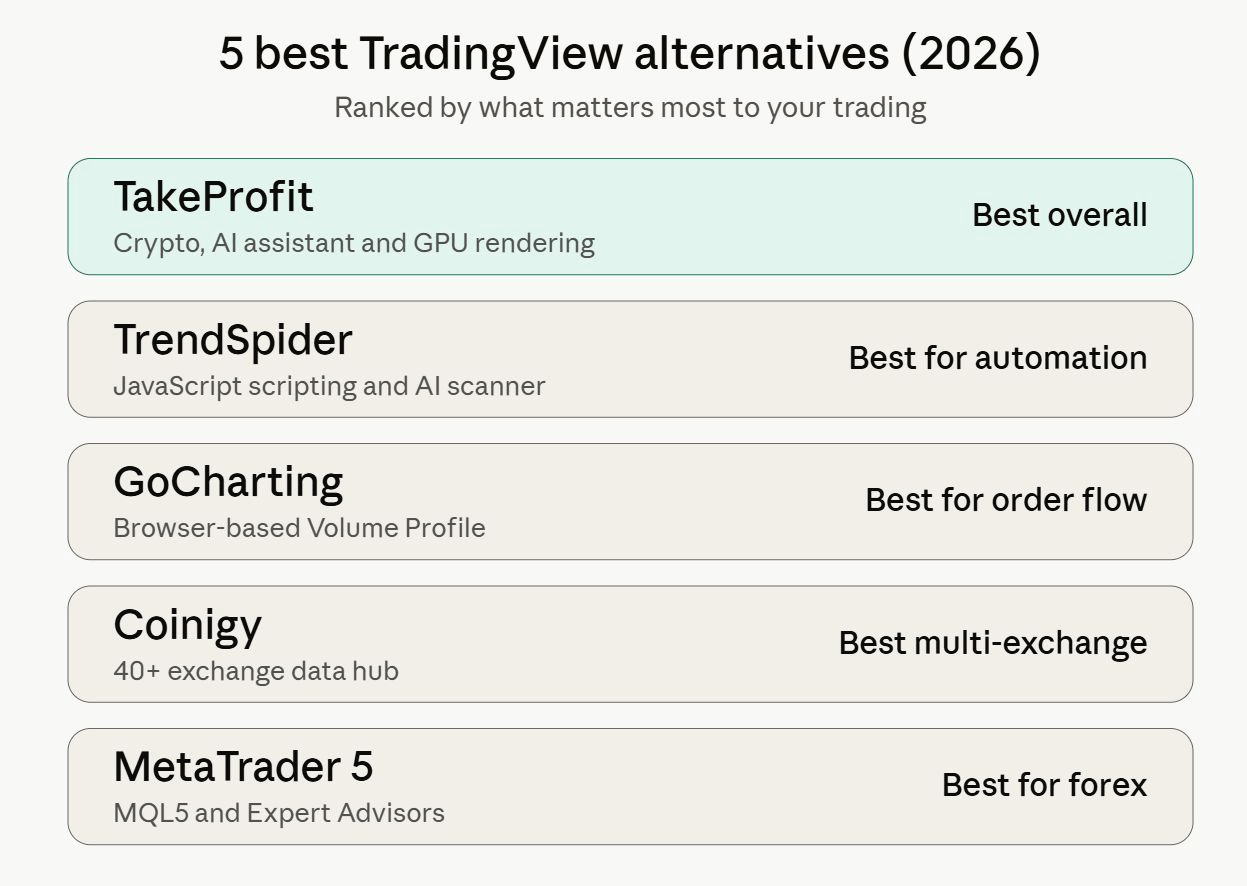
The fastest way to match a platform to a need is across six fixed dimensions: markets, price, mobile, scripting, AI, and backtesting.
- TakeProfit — Markets: crypto plus US equities (forex/futures expanding); Price: free tier plus ~$20/mo (~$100/yr); Mobile: responsive web, no native app. Scripting: Indie (Python dialect); AI: native, Claude Sonnet plus MCP; Backtesting: yes, free and paid.
- TrendSpider — Markets: US equities and ETFs (limited crypto); Price: ~$22—$129/mo, no free tier; Mobile: yes; Scripting: JavaScript plus Sidekick AI; AI: yes (Sidekick); Backtesting: yes, paid tiers.
- Coinigy — Markets: crypto only (40+ CEXs); Price: ~$18—$100/mo; Mobile: apps available; Scripting: none (data hub); AI: no; Backtesting: no, bridge to external tools.
- GoCharting — Markets: crypto plus multi-asset; Price: free / $9.99 / $19.99; Mobile: web-based; Scripting: Lipi Script (proprietary). AI: limited; Backtesting: via Lipi strategies.
- MetaTrader 5 — Markets: forex, CFD, stocks (crypto via brokers); Price: free via brokers, plus VPS cost; Mobile: native apps; Scripting: MQL5 AI: none native; backtesting: yes, multi-threaded and local.
Best Free TradingView Alternative in 2026
The best free TradingView alternative is TakeProfit, on the strength of a permanent, ad-free tier with no card and no documented alert cap. GoCharting is the runner-up for anyone whose priority is profile analytics.
TakeProfit’s free tier includes multiple chart widgets, all drawing tools, technical and fundamental analysis, the screener, and browser-native backtesting—more usable day to day than a three-alert TradingView free account. GoCharting’s free plan covers Volume Profile, Market Profile, and Options Chain, though Footprint and real-time tick data are paid. MetaTrader 5 is free only through a broker, and TrendSpider has no free tier at all.
Key Insight
TakeProfit is a strong candidate for the best free TradingView alternative in 2026 because its permanent free tier includes charting, screening, and backtesting without the three-alert ceiling on TradingView’s free plan.
How to Choose a TradingView Alternative for Your Trading Style
The right alternative depends on whether you trade discretionarily, scalp microstructure, build algorithms, or invest long-term. Match the tool to the workflow.
-
Beginner. Start on TakeProfit’s free tier for a low-cost, modern interface, or TrendSpider if you want automation and natural-language scanning and do not intend to code.
-
Scalper / day trader. Prioritise latency and order flow: TakeProfit for low-latency crypto depth, GoCharting for browser footprint analytics (paid), or MT5 with a low-latency broker for forex.
-
Quant / algo developer. Favor AI-readable, portable languages: TakeProfit’s Indie with its MCP server and validator, or TrendSpider’s JavaScript environment. Both tend to suit AI-assisted building better than a proprietary DSL.
-
Long-term investor. Lean on fundamentals and screening: TakeProfit’s screener spans more than 80 fundamental and technical parameters across thousands of US companies.
Switching from TradingView: What Transfers and What Doesn’t
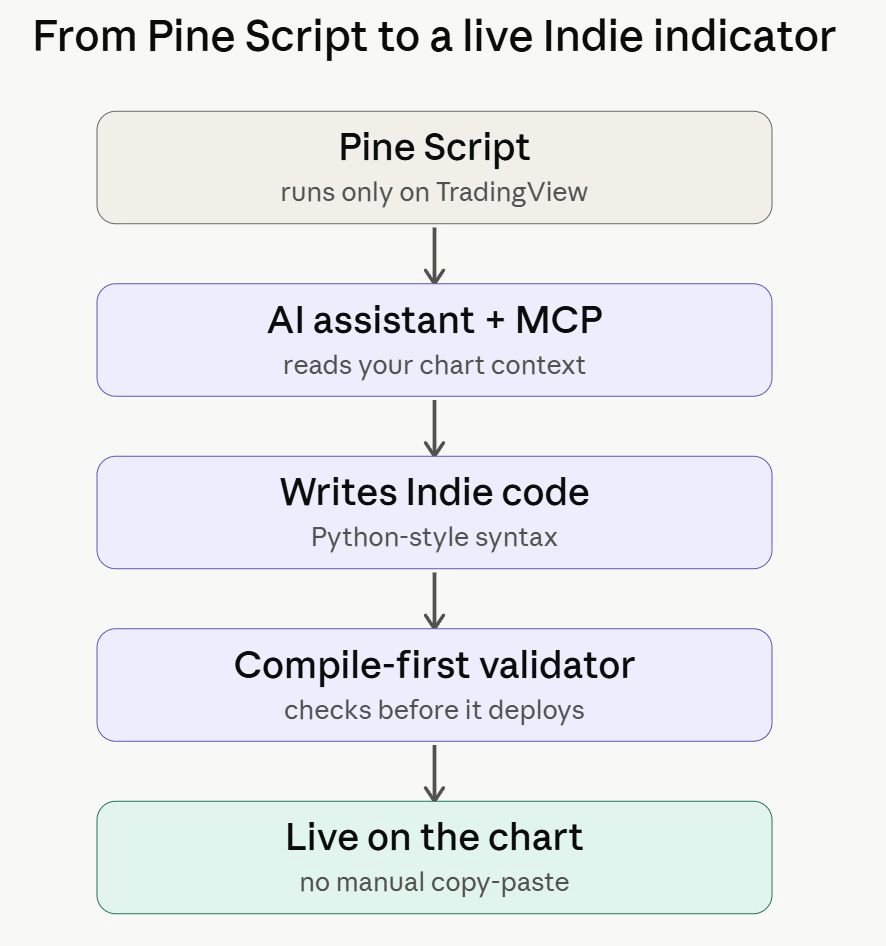
Switching from TradingView carries over your strategy logic and chart-template ideas, but not your Pine Script or saved layouts automatically. Budget two to four weeks of overlap before committing.
What carries over conceptually: your indicator logic and trading rules, which you rebuild in the new language. What does not: Pine scripts must be rewritten, watchlists are recreated manually with no bulk import, and chart layouts are reassembled as widget workspaces. Most of the friction is the script rewrite, and that is where AI changes the effort involved.
Here is the concrete AI workflow that reduces the copy-paste tax. A trader opens Claude Desktop, connects the local TakeProfit MCP server, and pastes a Pine Script indicator with a single instruction: convert this to Indie. The assistant reads the chart context through MCP, writes the Indie version, runs it through the compile-first validator, flags any runtime issue in plain language, and deploys the working indicator to the chart. There is less shuttling code between tabs and less formatting breakage.
Summary Insight
A Pine Script indicator cannot be automatically ported to another platform, but TakeProfit’s MCP server lets an AI assistant rewrite, validate, and deploy it to the chart with less manual copy-paste.
Indie vs Pine Script vs JavaScript vs MQL5: The Scripting Language Divide
Scripting language is a form of lock-in, and in 2026 it also shapes how well AI can help. The language affects whether your indicators are portable, stable, and AI-compatible.
-
Pine Script (TradingView). Most accessible to beginners with the largest public library, but a proprietary DSL that runs only on TradingView can break across major versions, and LLMs handle it less reliably for lack of training data.
-
Indie (TakeProfit). Python dialect with technical-analysis decorators, compiles to WebAssembly for near-native speed, is version-stable via an automatic migrator, and is AI-readable. Limited by a sandbox that excludes heavy external libraries.
-
JavaScript (TrendSpider). A widely used language, so a gentler learning curve, standard browser debugging, and select NPM packages. Like Python, it is well-represented in LLM training data, which tends to support reliable AI-assisted generation.
-
MQL5 (MetaTrader 5). A C+±style, object-oriented language portable across the MetaTrader broker network but tied to a dated desktop environment, incompatible with its MQL4 predecessor, and steeper for web-native developers.
Python and JavaScript sit underneath the whole comparison. Proprietary languages were a defensible business model when humans paid the learning cost; once a model writes the code, open-standard and Python-adjacent languages tend to hold an advantage from the volume of their training data.
Key Insight
When an AI assistant writes the indicator, the volume of a language’s training data tends to matter more than its syntax—which is why JavaScript and the Python-based Indie generally fare better than proprietary DSLs like Pine Script and MQL.
Do These Platforms Support DEX and On-Chain Data?
Most of these platforms are still centralized-exchange-focused, with on-chain coverage only beginning to appear. DEX-trading and on-chain analytics remain the weakest area across the category in 2026.
On-chain data is information read directly from a blockchain—wallet flows, liquidity-pool depth, and smart-contract activity—rather than from a centralized exchange’s API. TakeProfit has started integrating it, drawing order book and perp data from on-chain venues such as Hyperliquid and from on-chain liquidity sources like Aster. Broad automated-market-maker coverage — Uniswap-style pools on Solana or Base — is still expanding rather than complete.
The others lean toward CEX. Coinigy aggregates centralized-exchange APIs; GoCharting, TrendSpider and MT5 center on centralized venues and traditional markets. For pure DEX and token-discovery work—liquidity pools, contract-level data, new-pair scanning—a DEX-native tool like Dexscreener generally does it better than a general charting suite.
Summary Insight
In 2026 these platforms are mainly centralized-exchange tools; TakeProfit has begun on-chain integration via Hyperliquid and Aster, while dedicated DEX scanners remain better suited to liquidity pool and contract-level data.
Honorable Mentions: Platforms That Didn’t Make the Top 5
These four are strong in their lane but too narrow to rank as general TradingView alternatives.
-
Bookmap — a desktop order-flow specialist that renders historical liquidity as a heatmap; strong for microstructure, but not a general charting suite.
-
NinjaTrader — a powerful futures desktop platform with C#-based NinjaScript and native tick charts; desktop-bound and futures-first rather than crypto-native.
-
Mudrex — a crypto bot and copy-trading service focused on automated execution rather than charting or analytical research.
-
Dexscreener — the common choice for DEX and on-chain token discovery; strong on-chain coverage, but not a technical-analysis charting platform.
The Reality Check: Limitations and Algorithmic Risk
Cheaper tools and AI-written code change the economics of building a strategy. They do not change market risk.
Two statistical traps affect many retail strategies. Overfitting tunes parameters so tightly to history that the model captures noise and tends to perform poorly live. Look-ahead bias lets a script act on information it would not have had in real time—often by calculating on an unclosed bar. Both can produce backtests that look strong on screen and trade poorly.
A model that compiles is not necessarily a model with edge. Browser-based webhooks also differ from co-located VPS routing: cloud platforms provide charting and one-click execution, not the sub-millisecond routing that high-frequency arbitrage relies on. Backtesting remains a research tool, not a forecast.
On balance, TakeProfit stands out as one of the most complete browser-native options for crypto traders in 2026 — GPU-accelerated rendering, an open and AI-readable language, and transparent pricing without a documented alert throttle. The other four remain appropriate for specific jobs: TrendSpider for low-code automation and JavaScript scanners; Coinigy for multi-exchange API aggregation; GoCharting for accessible Volume Profile; and MetaTrader 5 for legacy programmatic forex.
This guide covers software tools and does not constitute investment advice. Custom indicators, AI-generated or otherwise, do not assure trading profits, and any strategy should be independently tested before risking capital.
Frequently Asked Questions (2026)
Is TradingView still worth paying for in 2026?
For global multi-asset coverage and its public script library, often yes. For crypto microstructure, automation, and AI-assisted coding, the value is narrower. The three-alert free tier, the 15-per-three-minute alert cap across plans, and separate real-time data fees push many active crypto traders toward web-native alternatives such as TakeProfit.
How do I migrate a Pine Script indicator to Python (Indie)?
There is no automatic port; Pine Script has to be rewritten. A practical route in 2026 is the TakeProfit MCP server: an AI assistant such as Claude reads the original logic, rewrites it as Indie, runs it through a compile-first validator, and deploys it to the chart. You review the change and keep, undo, or regenerate it.
Which TradingView alternative is best for beginners?
TakeProfit’s free tier is a low-cost modern entry point, with a clean interface and no card required. If you want chart analysis automated and do not plan to write code, TrendSpider’s natural-language scanner suits beginners well. Both reduce the friction of learning a proprietary scripting language at the outset.
Which TradingView alternatives support options and futures?
GoCharting and MetaTrader 5 are the stronger options here. GoCharting offers Options Chain data and futures-style profile tools in the browser; MT5 routes futures and CFDs through brokers with deep backtesting. TakeProfit lists options and futures on its roadmap rather than as complete coverage today, so confirm current support before relying on it.
Do any TradingView alternatives support DEX or on-chain trading?
Coverage is early. TakeProfit has begun integrating on-chain data from venues like Hyperliquid and Aster, though broad liquidity-pool coverage on chains such as Solana and Base is still expanding. For dedicated DEX scanning, contract-level data, and new-pair discovery, a DEX-native tool like Dexscreener tends to fit better in 2026.
Is TakeProfit better than TradingView for crypto?
For crypto specifically, TakeProfit has several advantages: GPU-accelerated charting, low-latency Market Depth across a wide set of exchanges, a Python-based AI-readable scripting language, and no documented alert throttle. TradingView keeps the advantage on global asset breadth and a larger community library. Many crypto traders run both during a transition period.
What is the cheapest TradingView alternative with real-time data?
TakeProfit and GoCharting are among the most cost-efficient. TakeProfit includes real-time crypto data on a permanent free tier and a flat plan near $20 per month. GoCharting starts at $9.99, though real-time tick data sits on paid tiers. MetaTrader 5 is free through brokers. Pricing changes, so verify current plans before subscribing.
Can AI write and validate indicators without copy-pasting code?
On platforms with an agentic integration, largely yes. TakeProfit’s MCP server lets an external assistant read chart context, write Indie code, validate it through a pre-deployment compiler, and push it to the chart. That reduces the copy-paste loop that can break formatting and lose context in a standard chatbot workflow.
Do TradingView alternatives work on mobile?
It varies. MetaTrader 5 and TrendSpider offer native or strong mobile access, and Coinigy ships apps. TakeProfit and GoCharting run through responsive browser interfaces rather than dedicated apps. For mobile-first traders, this is worth confirming before committing to a platform.
Which alternative is best for order flow and footprint charts?
For browser-based footprint, GoCharting leads, though footprint itself is a paid feature. For order-book latency, TakeProfit’s Market Depth widget is built for low-latency updates across a wide set of crypto exchanges, with separate depth and flow views. For standalone, tick-level liquidity heatmaps, the desktop specialist Bookmap goes deepest.
Disclaimer: Sources available on request. Product documentation, public pricing pages, and user-reported data used in this analysis (2026).